Free · code breakdown and status
Chestny ZNAK marking code check online
Paste a code: we’ll show what it consists of and its status in Chestny ZNAK. The owner, documents and box contents are shown in the Truemark account: with a scanner, boxes and pallets.
Example:
The breakdown works in the browser. To show the status, the code is sent to the Truemark server.
Scanner won’t read codes? Check its setup on a test code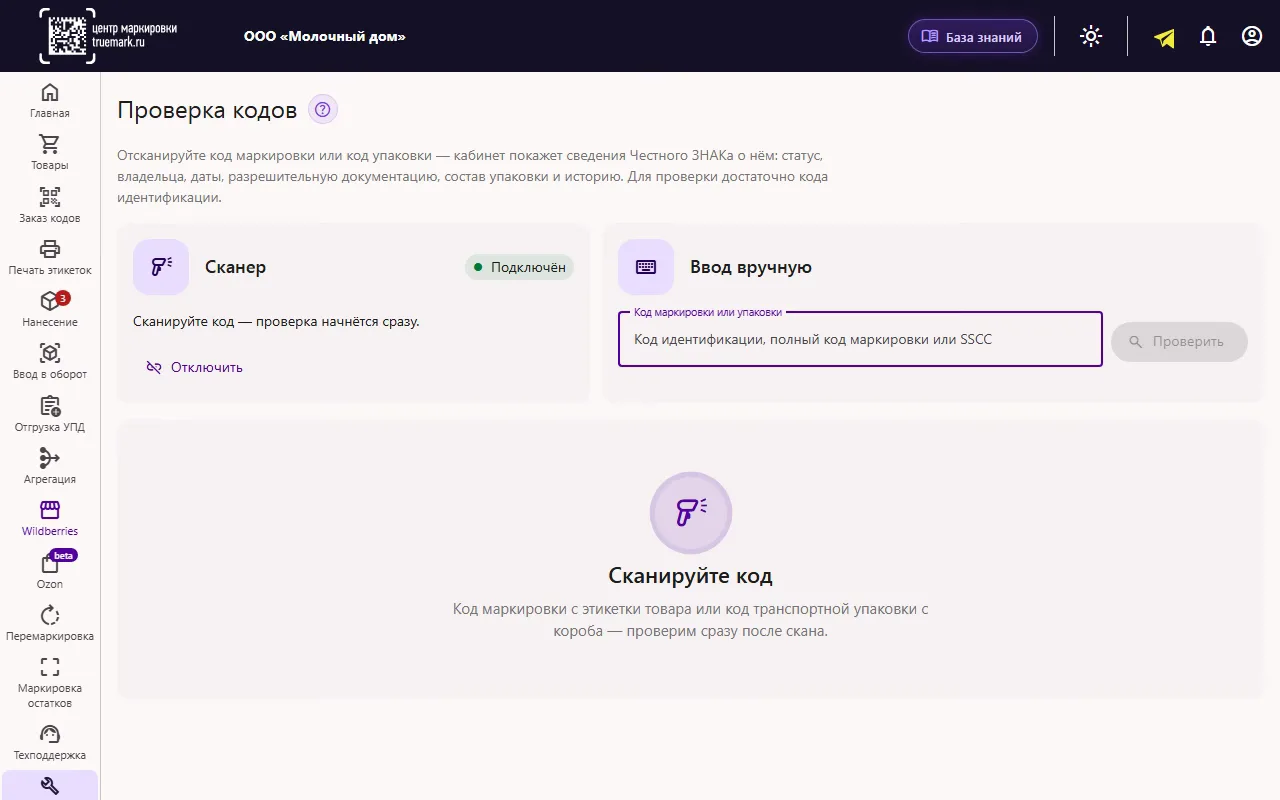
In the Truemark account
The account shows the code status and its owner
Scanner or manual entry, and the Chestny ZNAK response on one screen.
Check in the account 7 days free, no commitmentHow to check a marking code. For a buyer, the free Chestny ZNAK app is enough: point the camera at the Data Matrix code, and it shows information about the product. On this page you can break the code into parts (GTIN, serial number and verification code) and find out its status: whether the goods can be sold. The breakdown works in the browser, and the status is requested via the Truemark server. A business also needs the owner, documents and box contents, and that’s what the check in the Truemark account shows.
Checked on November 7, 2026.
What the check shows
Everything about a marking code on one screen
The code card brings together Chestny ZNAK information and your account data. No need to search through different sections.


Screenshots from the account’s demo environment. Click a picture to take a closer look.
Boxes and pallets
Checking box and pallet codes by SSCC
Scan the code of a shipping package, and the account shows what’s inside: how many items, in what status and which goods. From a box you can go up to the pallet, and from any item go to its card.
- 1
A product code knows its box
The code card shows Part of SSCC package and the button Check package.
- 2
Contents at a glance
A summary of item statuses, for example In circulation · 23 and Retired · 1. A retired code in a box is visible before shipment.
- 3
How much of each product
The quantity of each product and the full list of items, with a button Check next to each.
- 4
The whole pallet
A pallet code shows the boxes inside and the number of items in each. Sets, group packages and ATKs are checked the same way.


By scanner or by hand
Checking a code with a scanner right in the browser
Connect a barcode scanner to the computer in COM port mode, and the account will see it in the browser. Then just scan: the check starts right after the scan.
- You don’t need a handheld terminal for checking in the browser; a regular scanner is enough. How to set up a scanner
- No scanner? Paste the code into the field. The identification code is enough for the check.
- Checked codes stay in the “Checked this session” list, so you can come back to a response without a new request.
- Codes of goods, group and shipping packages, sets and ATKs.
Handheld terminals and marketplaces
Checking a code on a handheld terminal and when picking marketplace orders
Besides the browser, marking codes in Truemark are checked in the warehouse with a terminal, and the account shows which Wildberries assembly task or Ozon posting a code is in.
On a handheld terminal, in the Truemark app
In the warehouse, codes are checked with a terminal in the “Code check” section. After a scan, the status in Chestny ZNAK is shown in large type, and the “Details” button shows the product, the owner and their INN, the manufacturer, production and expiry dates, the product group, the packaging type and documents.
Which Wildberries assembly task or Ozon posting a code is in
In the Truemark account, “Code check” shows not only the status in Chestny ZNAK but also where the code is on your side: in which order, print, introduction into circulation and UTD, and which Wildberries assembly task or Ozon posting it’s in. The task or posting number opens it in the account. This page doesn’t have such data; it’s only in the account.
Who it’s for
Who needs the check marking codes
Manufacturers
From a code on the line, you can see the order, the PDF page with the label, the code application report and introduction into circulation. It’s easy to find where a specific label was printed and applied.
Importers
You can see whether codes applied abroad have been introduced into circulation, and which box and pallet they’re packed in.
For wholesalers and distributors
Receiving boxes from a supplier: what’s inside, what status the codes are in and who owns them, even before signing the UTD.
For Wildberries and Ozon sellers
Before shipping to the marketplace warehouse, you can see whether a box has retired or foreign codes. On Wildberries such codes are called KIZ.
How to start
Three steps to your first check
- 1
Sign up
Signing up for Truemark takes a couple of minutes. For the first 7 days, all features are free and with no commitment.
- 2
Sign in with an electronic signature
The signature is needed so the account can get Chestny ZNAK information about codes.
- 3
Open “Code check”
The “Tools” section. Connect a scanner or paste a code into the field and click “Check”.
Marking code
What a marking code is and what it consists of
A Chestny ZNAK marking code is a Data Matrix code on each unit of goods. It’s built to the GS1 standard and consists of parts with identifier numbers. This is how the account breaks it down:
(01) GTIN
14 digits, the product code. It tells you what the product is. What a GTIN is
(21) Serial number
The unique number of a specific item. Together with the GTIN, it forms the identification code, which is enough for a check.
(91), (92), (93) Crypto tail
The verification key and code. They protect the code from forgery, and you can’t do without them at the checkout or when receiving goods.
The parts of the code are separated by the GS control character. A box or pallet code is simpler: (00) and the 18-digit SSCC, with no crypto tail. From this code, Chestny ZNAK knows which codes are packed inside.
Statuses
What the status of a marking code means
This is how Chestny ZNAK statuses are labeled in the account. More in the article “Marking code statuses”.
- Issued
The code is issued but not applied to goods.
- Applied
The code is applied to goods but not introduced into circulation.
- In circulation
The code is introduced into circulation, and the goods can be sold.
- Retired
The code is withdrawn from circulation, for example the goods were sold.
- Unpaid
The code is applied but not paid for.
- Disaggregated
The package has been disaggregated.
- Written off
The code is written off, for example the label was spoiled before application.
- Not found
Chestny ZNAK doesn’t know this code. Check that the code was entered in full.
Checking goods as a buyer?
Point the camera at the Data Matrix code in the official Chestny ZNAK app. The app shows information about the product and the code status. The Truemark account is for those who mark, sell or receive goods themselves.
Questions
Frequently asked questions about checking marking codes
Didn't find an answer? Write to us, and an expert will reply in 15 minutes on average. More answers in the knowledge base and blog.
How do I check a Chestny ZNAK marking code?
In the Truemark account, open “Tools”, then “Code check”. Scan the code with a scanner or paste it into the field. The account shows the code status in Chestny ZNAK, its path from issuance to introduction into circulation, the owner, documents and package contents. For a buyer checking goods in a store, the official Chestny ZNAK app is more convenient.
How is the code breakdown on the website different from the check in the account?
The website breaks the code into parts in the browser and shows its status from Chestny ZNAK data: whether the goods can be sold. The owner, documents, code path and package contents are shown in the Truemark account, which is also where codes are checked with a scanner and by box.
Can I check a box or pallet code?
Yes. Scan the SSCC of the shipping package: the account shows how many items it holds, what status they’re in and which goods are inside. From a box you can go to the pallet, and from the list of items to any code.
How do I check a marking code with a scanner?
Connect the scanner to the computer in COM port mode and click “Connect scanner” in the tool. After that, the check starts right after the scan. You don’t need a handheld terminal for this.
How do I find out which Wildberries assembly task or Ozon posting a code is in?
In the Truemark account: “Code check” shows not only the code status in Chestny ZNAK but also where it is on your side (in which order, print, introduction into circulation and UTD) and which Wildberries assembly task or Ozon posting it’s in. The task or posting number opens it in the account. This page doesn’t have such data; it’s only in the account.
Can I check a marking code on a handheld terminal?
Yes, in the Truemark app on a handheld terminal. Open the “Code check” section and scan the code: the status in Chestny ZNAK is shown in large type, and the “Details” button shows the product, the owner and their INN, the manufacturer, production and expiry dates, the product group, the packaging type and documents.
How do I check a KIZ?
On Wildberries, a Chestny ZNAK marking code is often called a KIZ. It’s checked like any code: with a scanner or by entering it in the “Code check” field. Before shipping, it’s worth checking the box codes too, so there are no retired codes inside.
What if the code isn’t found?
Most often the code was copied incompletely or with an error. The identification code, that is, the GTIN and serial number, is enough for the check. If Chestny ZNAK doesn’t know the code, the account says so: “Code not found in Chestny ZNAK”.
What information is visible for someone else’s code?
Chestny ZNAK returns the status, code path, package contents and owner for the product groups your company works in. For other groups, the account shows open information about the product.
How much does code checking cost?
The tool is included in all Truemark plans. For the first 7 days, all features, including code checking, are available for free and with no commitment.
Do I need an electronic signature?
Yes. Signing in with an electronic signature gives the account access to Chestny ZNAK information. If access has expired, the account offers to renew it right on the check screen.
Free tools
More checks
Check codes in the Truemark account
A scanner, codes of goods, boxes and pallets, status and history in Chestny ZNAK. And everything else for marking: code orders, label printing, introduction into circulation, aggregation and UTDs.
Or leave a request
We’ll answer about volumes, pricing and getting started. Leave your phone or email and your question in the request form.