December 1New requirements for 5 groups: grocery products, animal feed, clothing and household linen, and 2 more · What to do
EN
Sign inTry for free

Massa-K scales

Massa-K label scales: connecting to Truemark over the network

Massa-K label scales on the RP terminal, for example MK-15.2-RP10, connect to Truemark over the network through Truemark Connect. The weight goes to the marking station, and the label printer prints the label with the code and weight. No scale driver or code files are needed.

Windows 10 and later · one file, no installation

Need it for macOS or Linux? Write to us

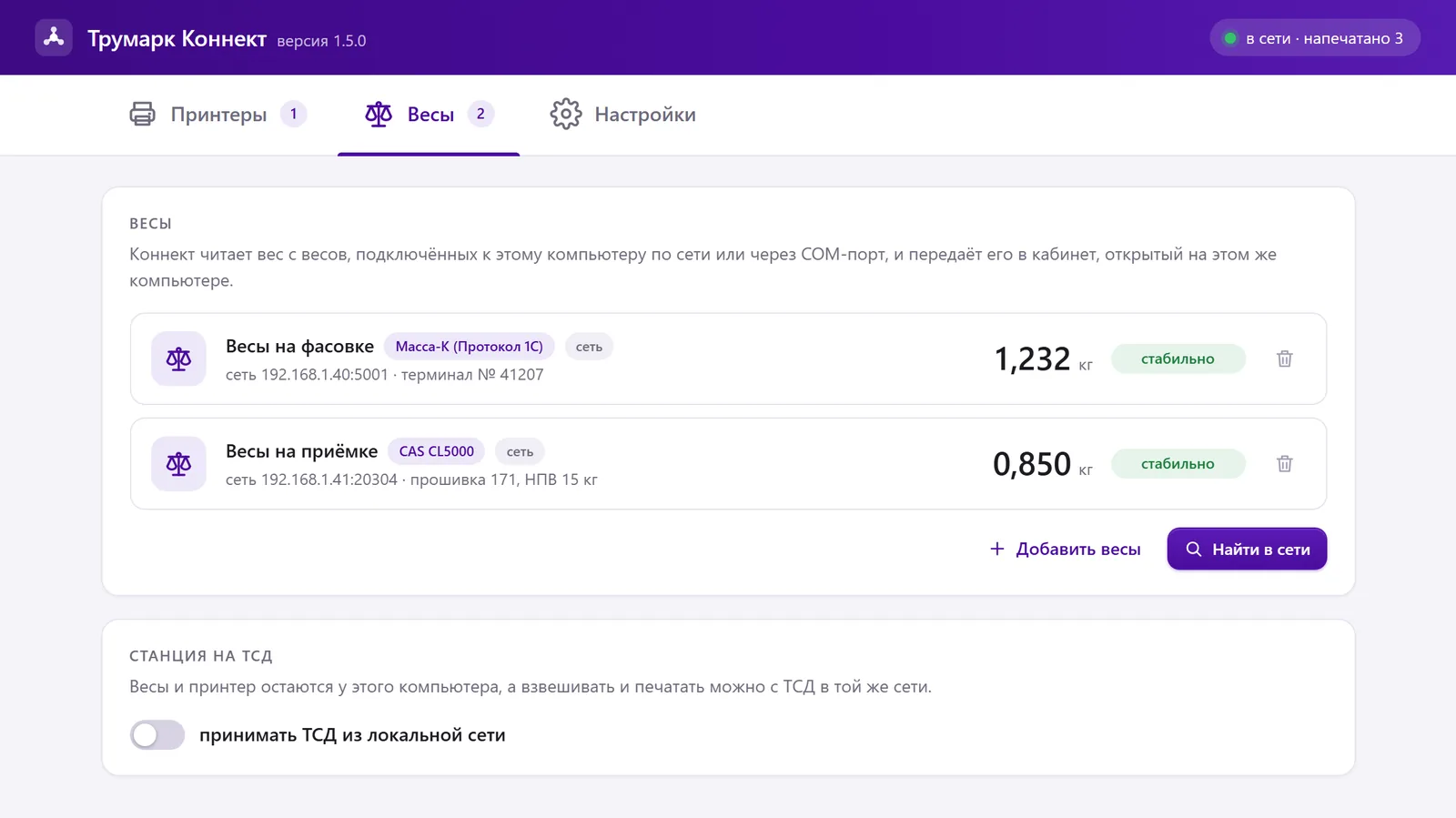
The “Scales” tab in Truemark Connect 1.5.0: Massa-K scales on the “1C protocol” show 1.232 kg and CAS CL5000 shows 0.850 kg, both “stable”, with the “Station on a handheld terminal” block below. Sample data
The “Scales” tab in Truemark Connect 1.5.0: Massa-K and CAS CL5000 with weight and “stable”. Sample data
port 5001
the scales’ Ethernet; “Find on network” finds them itself
10 times
per second Connect asks for the weight
net
as on the display: tare and zero are on the scales
up to 8
weigh and print from handheld terminals on the same network

How it works

The scales weigh, the printer prints the code

Massa-K label scales work with Truemark as scales: the weight goes over the network to the marking station, and the label printer at the computer prints the label with the marking code, weight and dates.

Massa-K scales

They weigh. The operator sets tare and zero on the scales as usual

Truemark Connect

Asks for the weight 10 times a second over the network and passes it to the account on this computer

Marking station

Once the weight is stable, the station takes a code from the order and builds a label with the weight and dates

Label printer

Prints the label with the code. The weight is on the label, in the code and in the application report

Printing on the scales or on a printer

Two ways to mark with Massa-K scales

Label scales can print the code themselves if they get a file with codes. Truemark does it differently: it doesn’t print on the scales themselves and sends the weight to the application report right away.

Printing on the scales themselves

Codes go to the scales as a file

  • Codes reach the scales as a file: via a USB flash drive, Ethernet or RS-232
  • The scales print the DataMatrix and write a file with the code and weight
  • The accounting system prepares the code file; the scales don’t submit the application report themselves
  • 58 mm wide label, thermal printing
Comparison based on the manufacturer’s documents

Scales and a label printer with Truemark

The code comes from the order in the account

  • The scales only weigh; Connect doesn’t change their settings
  • The station takes the code from the order; no code files needed
  • The label printer prints the label with the code, weight and dates
  • The weight goes straight to the application report
Marking station

Connecting

How to connect the Massa-K RP10 over the network

No scale driver is needed, and no cable to the computer either: Connect reads the weight over the network itself. How to install Connect is in the article how to install Truemark Connect.

  1. 1

    Connect the scales to the network

    With an Ethernet cable to the same router or switch as the computer with Connect

  2. 2

    Find the scales’ address

    In the scales menu: «Параметры терминала» → «Параметры интерфейса» → «Ethernet» (terminal settings → interface settings → Ethernet). The IP address and port 5001 are there.

  3. 3

    Download Connect

    One file, TruemarkConnect.exe, for Windows 10 and later. Connect the computer to the account: “Settings” → “Devices” → “Connect”.

  4. 4

    Add scales

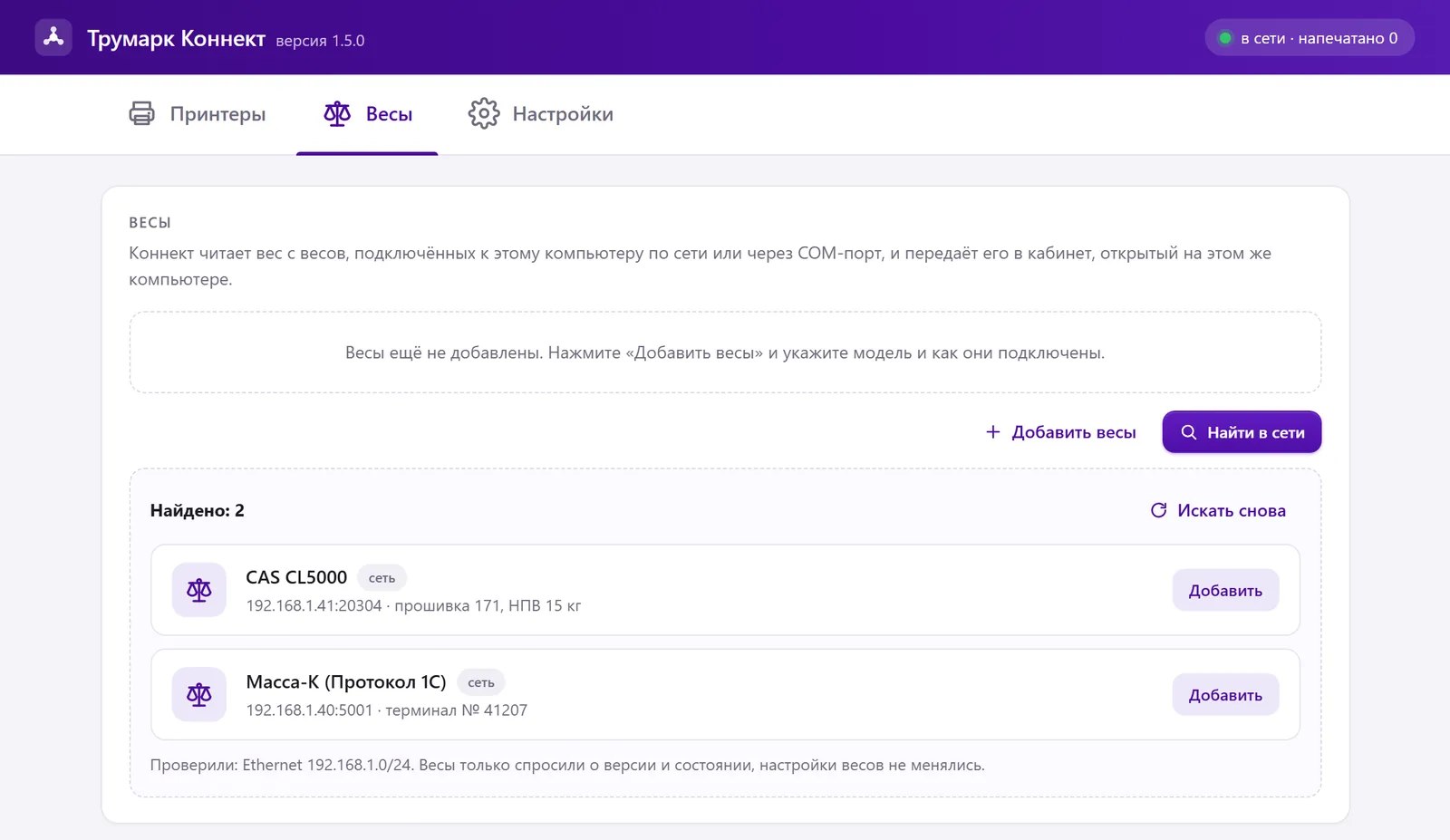
    On the “Scales” tab, click “Find on network” («Найти в сети») and “Add” («Добавить») next to “Massa-K (1C protocol)”. Add scales on another subnet manually: model, IP address and port.

  5. 5

    Check the weight

    Put a load on: the “Scales” tab shows the weight and “stable”, as on the display. From then on, the marking station and handheld terminals see the weight.

Scale search in Truemark Connect 1.5.0: “Find on network” found Massa-K (1C protocol) and CAS CL5000, each with an “Add” button. Sample data
“Find on network” on the “Scales” tab: Massa-K found via the “1C protocol”; all that’s left is to click “Add”. Sample data

Which Massa-K models fit

RP terminal: tested hands-on

The scales’ terminal provides the weight. “Tested” means we connected it ourselves: MK-15.2-RP10 with a load and tare, on November 21, 2026. “By protocol” means it works by the same rules, but we haven’t tested the model itself.

ScalesHow they connectStatus
Massa-K on an RP terminalWith label printing, for example MK-15.2-RP10Over the network, model “Massa-K (1C protocol)”Tested over the network
Massa-K on an R2P terminalWith label printingOver the network, the same model “Massa-K (1C protocol)”By protocol
Massa-K with protocol 100Over the networkModel “Massa-K (protocol 100)”, also works with the station on handheld terminalsBy protocol
Massa-K with protocol 100 by cableUSB or RS-232Right in the browser, without ConnectBy protocol
Other Massa-K terminalsFor example, RLSend us the model and we’ll check the exchange protocolNot tested
Another terminal or other scales?

Send us the scale model and the exchange protocol description from the manufacturer or supplier: we’ll check whether it fits and discuss the integration

Discuss scales

Scales of other brands, CAS and MERTECH, are in the list of scales for Connect.

What Connect does with the weight

It only reads the weight: the scales work as before

Read-only

Connect asks the scales for the terminal number and the weight. It doesn’t touch tare, zero or printing on the scales.

Net, as on the display

With a tare on the scales, they give the net weight, exactly what’s on the display, and Connect passes it on as is

10 times a second

The weight refreshes every 100 ms. In our test, the scales responded in 3–104 ms.

Status in words

Stable, weighing, overload or no connection with the reason. The station prints once the weight is stable.

Station on a handheld terminal

The scales stay at the computer with Connect, and you can weigh and print from handheld terminals on the same network, up to 8 handheld terminals

The scales aren’t reconfigured

During the search, the scales are only asked for their version and status. Connect doesn’t change the scales’ firmware or settings.

Questions

Frequently asked questions

Didn’t find an answer? Write to us, and an expert will reply in 15 minutes on average. The station step by step is in the knowledge base.

Can Chestny ZNAK codes be printed on Massa-K label scales?

Massa-K scales with RP and RL terminals print DataMatrix from a code file themselves. The accounting system prepares the file, and the scales don’t submit the application report. With Truemark, the scales only weigh: the marking station takes the code from the order, the label printer prints the label, and the weight goes straight to the application report.

How do I connect Massa-K scales to a computer?

Over the network, through Truemark Connect: the scales and the computer are on the same network; in Connect, on the “Scales” tab, click “Find on network” («Найти в сети») and “Add” («Добавить») next to “Massa-K (1C protocol)”. If the search doesn’t see the scales, add them manually by the IP address and port from the scales menu: «Параметры терминала» → «Параметры интерфейса» → «Ethernet».

Do I need a Massa-K scale driver?

No. Connect reads the weight over the network itself, using the scales’ protocol; you don’t need to install the manufacturer’s driver.

Which model should I choose in Connect?

“Massa-K (1C protocol)” is for label scales on the RP and R2P terminals. “Massa-K (protocol 100)” is for Massa-K scales with protocol 100 over the network. “Find on network” tells the two protocols apart itself.

Will the MK-6.2-RP10 and MK-32.2-RP10 work?

Connect works with the RP terminal, and these scales have the same one as the MK-15.2-RP10 on which we tested the connection. After adding them, compare the weight on the “Scales” tab with the display.

The search doesn’t find the scales. What should I do?

“Find on network” («Найти в сети») sees devices only on its own subnet. If the scales are on another one, click “Add scales” and enter the model, IP address and port 5001. Also check that the scales are on and connected by cable.

Does Connect change the scale settings?

No. During the search, the scales are only asked for their version and status, and during work, for the weight. Connect doesn’t touch tare, zero or printing on the scales.

What weight goes to Truemark if there’s a tare on the scales?

Net, exactly what’s on the display. The scales subtract the tare themselves, and Connect passes the weight on as is.

Can I weigh from a handheld terminal?

Yes. In Connect, on the “Scales” tab, turn on “Station on a handheld terminal”: the scales and printer stay at the computer, and you can weigh and print from handheld terminals on the same network, up to 8 per computer.

Is there Connect for macOS or Linux?

Truemark Connect is released for Windows 10 and later. If you need it for macOS or Linux, write to us or leave a request at the bottom of the page, and we’ll discuss it.
Connect Massa-K scales to Truemark

Download Connect, find the scales on the network and print the first label with the weight. 7 days of full access for free, no card required.

Try for freeSales: +7 812 765-02-50 · info@truemark.ru

Or leave a request

We’ll answer about volumes, pricing and getting started. Leave your phone or email and your question in the request form.